Video Invitations: Turn Your Invitation and Photos Into a Video
Make a video invitation in a few clicks. Start from your design, add photos, pick a reveal like a wax seal envelope, and watch the people in your photos come to life. Perfect for weddings.
A printed invitation has a moment built in: the envelope, the seal, the card sliding out. A link in a group chat usually doesn't. A video invitation brings that moment back, and with Ainviter it takes a few clicks, not a film crew.
The video studio turns your invitation design and your own photos into a short video. Pick how it opens, choose a length, and the people in your photos come to life. It's especially lovely for weddings and save-the-dates.
What a Video Invitation Looks Like
Here's a 10-second wedding video made from just two things: the invitation design and one photo of the couple.
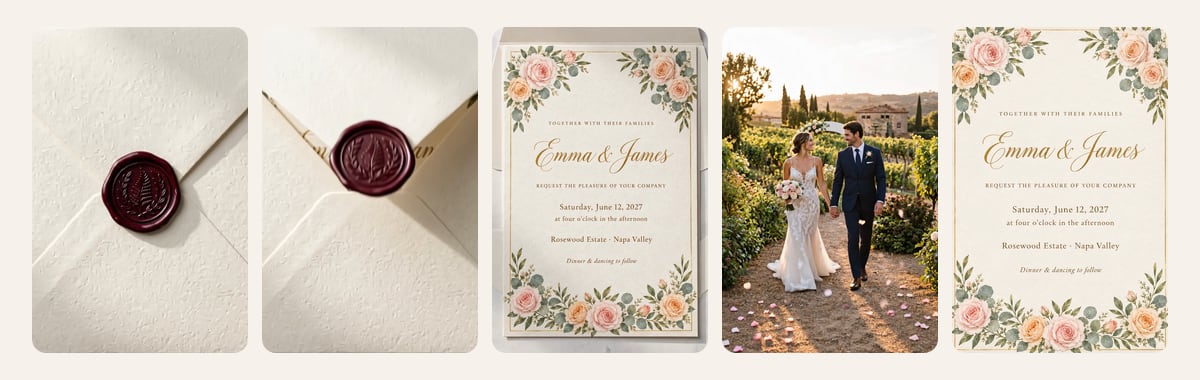
A wax seal envelope opens, the card slides out, and the camera follows the couple, hand in hand, down a petal-strewn path toward their wedding arch. The video settles on the invitation, with every name, date, and detail sharp and readable.
You can watch the full video on our video invitation maker page.
How to Make a Video Invitation
1. Start from your invitation. Open your invitation and tap Create on the Video card. Starting fresh? Pick Video above the chat box on the homepage before you describe your event, and the video studio opens as soon as your design is ready.
2. Add your photos. Your design comes first. After it, add up to 4 photos from your library or upload new ones. The people and pets in them come to life in the video.
3. Pick a reveal. Choose how your invitation appears: a wax seal envelope, balloons, flowers, golden sparkle, a curtain, confetti, or candlelight. You can also describe your own reveal, or skip it and simply animate your design.
4. Choose a length. 5, 8, or 10 seconds. A reveal plus a photo or two looks best at 8 or 10 seconds.
5. Add instructions (optional). Describe what should happen, such as "the couple walks hand in hand as petals drift by." Not sure what to write? Tap Write with AI, and it drafts directions based on your event, photos, and reveal.
6. Tap Generate video. It takes a minute or two. You can close the studio while it works; the video appears on your invitation when it's ready.
Choosing a Reveal
- Wax seal envelope: classic and romantic. The natural pick for weddings, engagements, and formal dinners.
- Flowers: blooms open to reveal the card. Great for bridal and baby showers and garden parties.
- Balloons: playful and bright, made for birthdays and kids' parties.
- Golden sparkle: glamorous for anniversaries, New Year's Eve, and milestone birthdays.
- Curtain: a stage-worthy entrance for galas, recitals, and graduations.
- Confetti: an instant celebration for any party.
- Candlelight: warm and intimate for dinners, holidays, and evening weddings.
Tips for Photos That Come to Life
- Show faces clearly. Well-lit photos with faces in focus give the most natural results.
- Full-length shots move best. If you want the couple to walk or dance, use a photo that shows them head to toe.
- Keep it to a few people. One to three people per photo works better than a large group shot.
- Use photos you love. The video stays true to the people in your photos, so pick the ones that feel most like you.
What Guests See
Your video plays at the top of the invitation page, right where the design used to be, so guests see it the moment they open your link. It plays silently on a loop, and RSVP, event details, and messages work exactly as before.
You can hide the video anytime with the Show video on invitation switch and bring it back later.
Plans and Variations
Video invitations are included with Premium, with 3 videos per event. Every video you make is saved, so you can switch which one appears on your invitation, or tap Reuse settings to start a new version from one you like.
Make Your Video Invitation
Start with an AI-generated design or your own upload, add a photo or two, and pick your reveal. Your guests get a moment worth opening, and you still get every RSVP in one place.
Try the video invitation maker and turn your invitation into a video in a few clicks.
Start for free
Your invitation is one sentence away.
Describe the event. Get a custom design. Share and track RSVPs.
Create free invitation